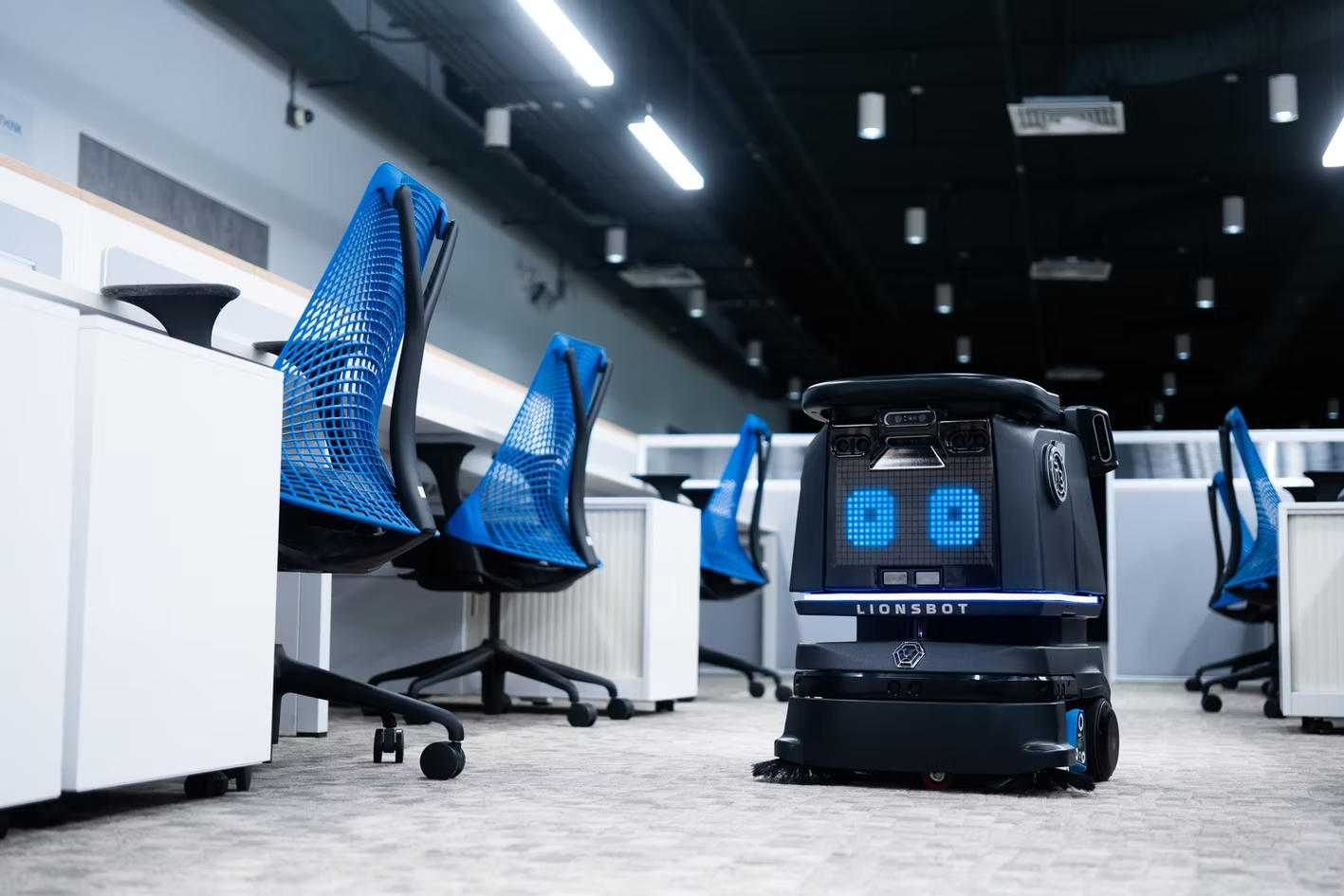
Lionsbot – Autonomous cleaning robots
Designing our way out of
a growth ceiling
UX Research · Product Design · Service Design · Systems Thinking
1M+
monthly active users across 14 APAC markets
73%
faster time-to-task
post-launch
14
markets served
one design system
50%
faster deployment
3 days → 1.5 days
75% + 67%
calibration and training time cut
1.5-2x
increased deployment capacity · same team · same cost
My role: Lead UX Designer · Project owner · Initiated, led and shipped end to end
Team: 3 designers (directed) · Robot Technicians · Software + Robot Engineers · Sales
Scale: 1,000+ cleaning robots deployed globally · 50+ Robot Technicians worldwide
Duration: 6 months
TL;DR
:: The Project
Lionsbot's commercial cleaning robots required a technician on-site for up to 3 days per deployment. With 1,000+ robots sold globally, that cost was becoming a ceiling on growth. This project redesigned the full deployment system to cut that time and scale the business.
:: My role
PM + Lead Designer. Set KPIs, defined the product roadmap, directed 2-3 designers, coordinated engineering and sales, led stakeholder alignment, and reported outcomes to leadership. No brief given — I initiated and owned the work end to end.
:: What I did
6 months of field research doing live deployments. Pushed back on the CEO's original target with data. Designed five concurrent interventions — Calibration Mode, OperatorGuide, Pre-deployment flow, Remote Technician model, and QuickReport — plus a deployment cookbook across 6 site types. Introduced the Remote Technician as a new organisational role.
:: Result
Average deployment cut from 3 days to 1.5 days. Calibration time down 75% per map. Training time down 67%. Same team now handles 2× the deployment volume at the same cost. Applied across 1,000+ robots globally.
:: Context
What is deployment, and why does it
matter to the business?
Lionsbot makes commercial cleaning robots sold to airports, hotels, supermarkets, schools, and warehouses. But selling a robot is only half the transaction. Before a customer can use it, the robot has to be physically set up at their site. That process is called deployment.
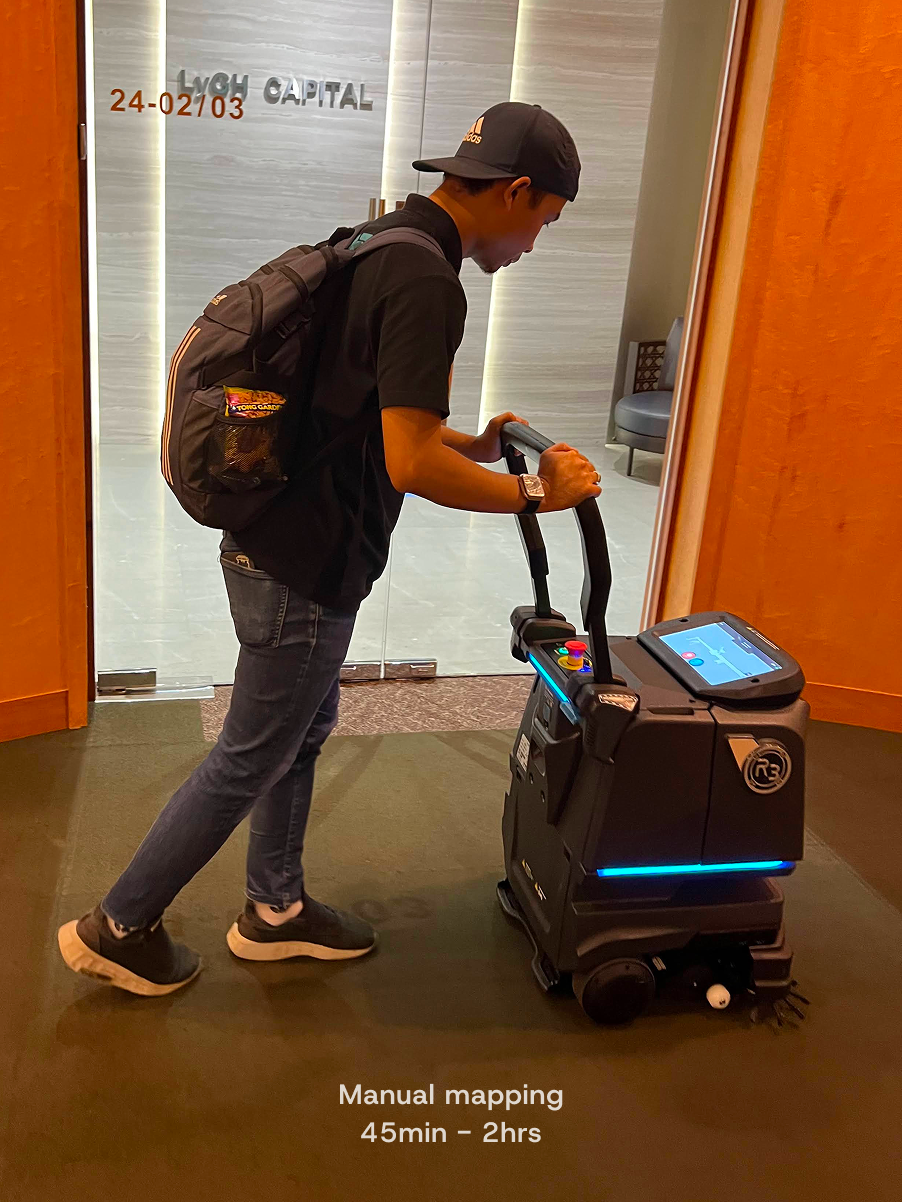
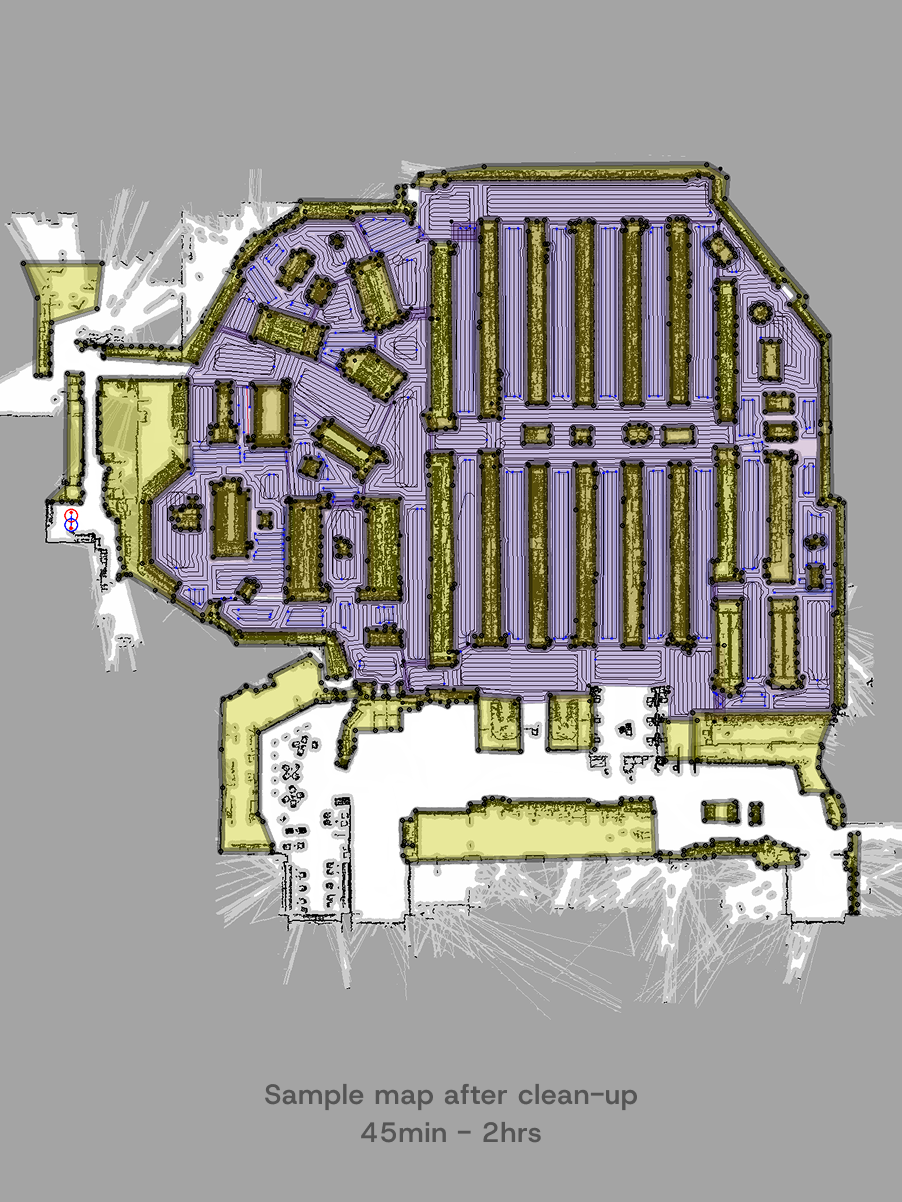
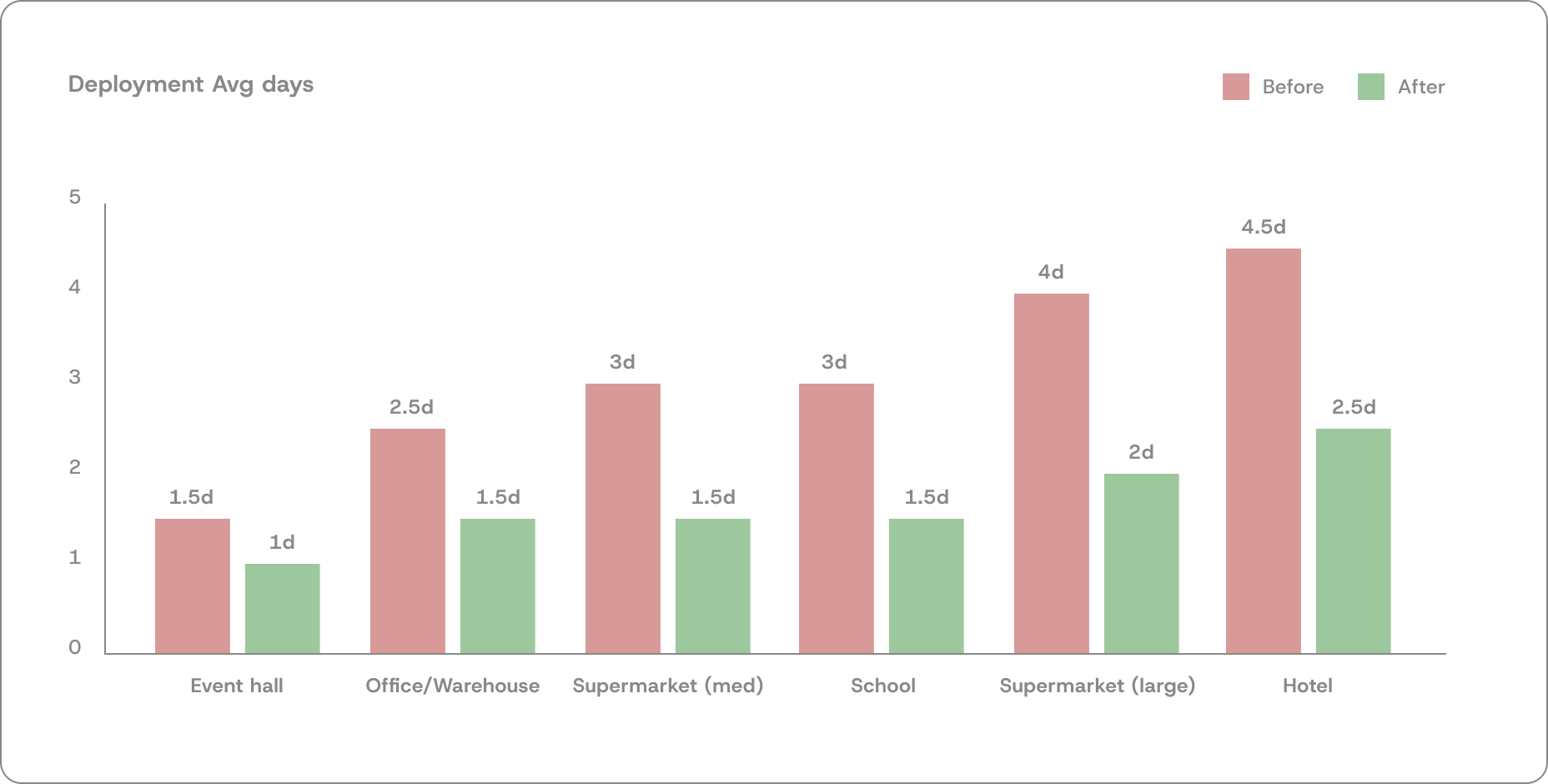
Deployment requires a Robot Technician to travel to the site — often by plane — and spend days on-site. They push the robot through every cleaning zone to map it using the robot's sensors, then edit the map files to mark restriction zones and cleaning areas, calibrate the robot by running and validating each map, train the site staff to operate it, and hand it over. Event halls might need 2 days. Hotels with 50 maps across multiple floors can take 4 or 5.
With 1,000+ robots sold and 50+ technicians distributed globally across Singapore, Hong Kong, the US, and Europe, every deployment means flights, hotels, and multiple days of skilled technical labour per site. The cost per deployment was high. And it was growing proportionally with every robot sold.
The business problem in one sentence:
Lionsbot was selling robots faster than it could deploy them, and the cost of each deployment was becoming a structural ceiling on how fast the company could grow.
This is the problem the CEO brought to me. There was no brief, no documented process, no existing research.
Just a target: get deployment time down from 3 days to 1.
:: My role
Lead Designer + Product Owner,
Deployment as a product
I led this project across both tracks — setting product direction, defining KPIs, prioritising the intervention backlog, and coordinating delivery across engineering, sales, and operations. At the same time I was directing two designers, writing briefs, running design reviews, and working hands-on across all five interventions.
Deployment is Lionsbot's core service offering — every robot sold creates a deployment obligation. I owned it end to end: setting success metrics, defining the product roadmap, leading stakeholder alignment, defining the rollout strategy per intervention, and reporting outcomes directly to leadership.
In practice
Set KPIs and progressive targets per site type · Directed 3 designers across parallel workstreams · Coordinated engineering across 2 shipped features · Ran a 3-month change management POC with Sales · Defined scope and responsibilities for the Remote Technician — a new organisational role that did not exist before this project
:: Approach and design process
Six phases:
Research & Design running in parallel throughout
This project did not follow a sequential research-then-design model. I was doing live deployments on-site while design work was already in progress. Each deployment surfaced new constraints that fed directly into whichever intervention was active at the time.
Months 1–6 · concurrent
Field research
6 months doing actual deployments. Not interviews, full on-site participation across every site type, failure mode, and workaround that existed nowhere in documentation.
Month 1
Reframe the brief
Early data showed the CEO's "3 days to 1" target was impossible for complex sites. Pushed back with evidence. Negotiated progressive, site-specific targets instead of a blanket mandate.
Months 1–2
System mapping
Mapped the full deployment lifecycle across every actor before designing any intervention. Service blueprint first. Understanding the system before redesigning parts of it.
Months 2–5
Parallel intervention design
Five workstreams running concurrently with different cross-functional partners. Each intervention shaped by what the latest deployment had surfaced in the field.
Months 3–6
Staged rollout + validation
Nothing shipped at once. Calibration Mode built in stages with on-site validation. The Zoho form ran as a 3-month POC before global rollout. Evidence before mandate.
Ongoing
Product roadmap
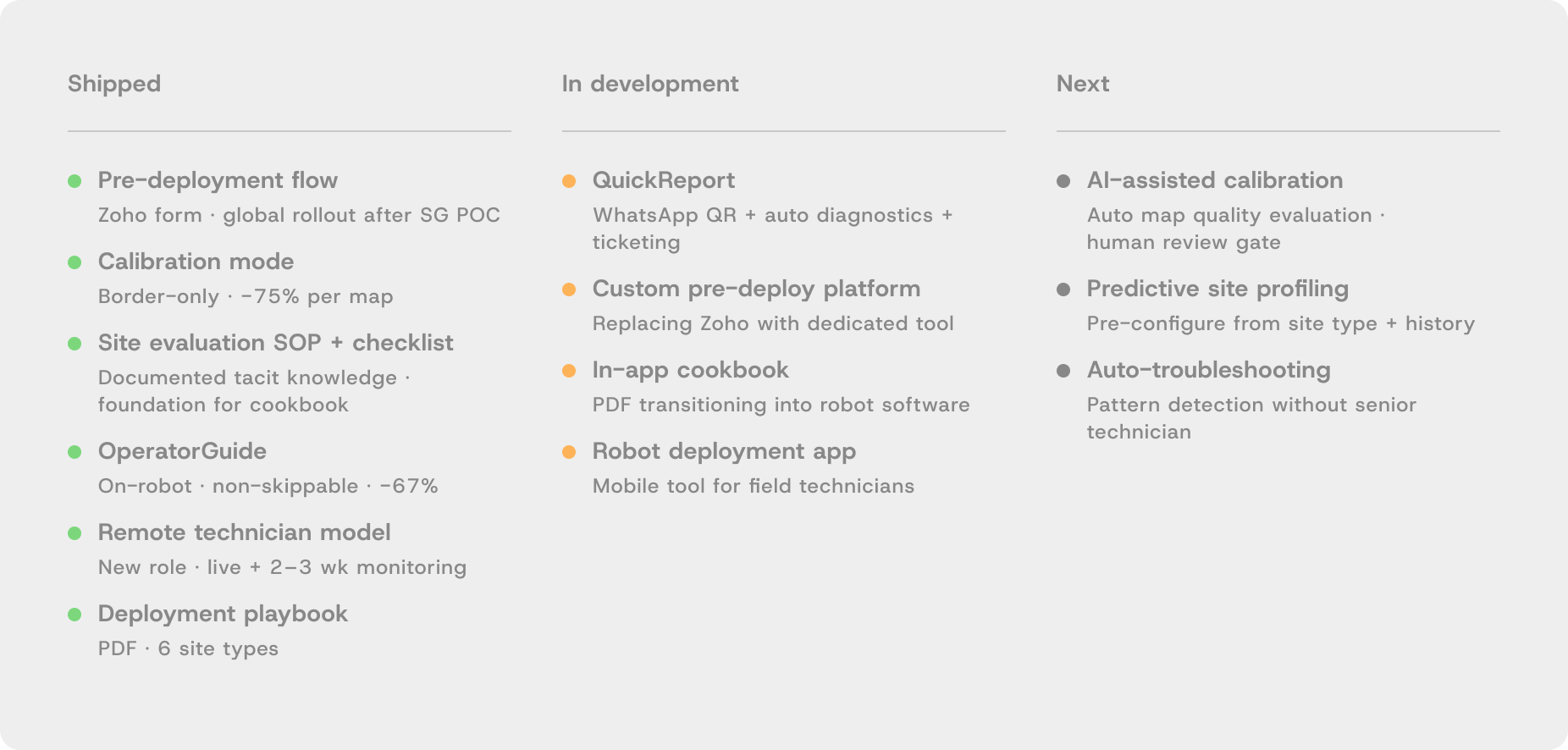
QuickReport in development. In-app cookbook planned. AI-assisted calibration on the horizon. Managing a product backlog, not closing a project.
:: Stakeholder management
Five relationships — each requiring a different approach
This project required coordinating across five groups, none sharing the same priorities. Getting each intervention built and adopted meant understanding what each stakeholder needed — and sometimes building the evidence that made the decision easy for them.
Client
CEO
Brought the problem. Set the initial target. Needed to trust that a more nuanced approach would deliver better results than a blanket mandate.
Pushback with data
Partner
Software + Robot Engineers
Built Calibration Mode and OperatorGuide. Needed staged delivery with on-site validation at each phase. Technical constraints shaped the design of both features.
Co-designed + shipped
Research partner
Robot Technicians
Primary research source. Did deployments alongside them. Held tacit knowledge that existed nowhere else — every workaround, every site-specific trick.
Field research
Conflict → alignment
Sales
Resisted the pre-deployment form. Required a 3-month POC with the Singapore team before global rollout. Data — not persuasion — made the decision easy.
POC → adoption
New role · created by this project
Remote Technician
Did not exist before this project. I defined the role scope, the two-phase support structure, the handoff model, and the tooling requirements.
Organisational design
The Sales conflict in detail:
Sales resisted the Zoho pre-deployment form because it required capturing site details — map count, floor area, interference conditions, access — before confirming a deployment date. They didn't always have this information and felt it added friction to closing deals. Rather than mandate it, I proposed a 3-month POC with the Singapore team, tracking return visits, first-day wasted time, and deployment duration. The data showed measurable improvement in sites where the form was complete. Sales presented the findings themselves. Global rollout followed within weeks.
:: The CEO conversation
The target was wrong, and I had the data to prove it
The initial brief was simple: cut deployment from 3 days to 1 day, uniformly, across all site types. Within the first month of field research it was clear why that target would fail.
Deployment complexity scales with the number of maps — and maps scale with floor area, number of floors, and the density of cleaning zones. An event hall might need 5 maps. A hotel might need 50. A uniform "1 day" target would be physically impossible for large hotels, or meaningless for simple sites — producing a standard too low to matter.
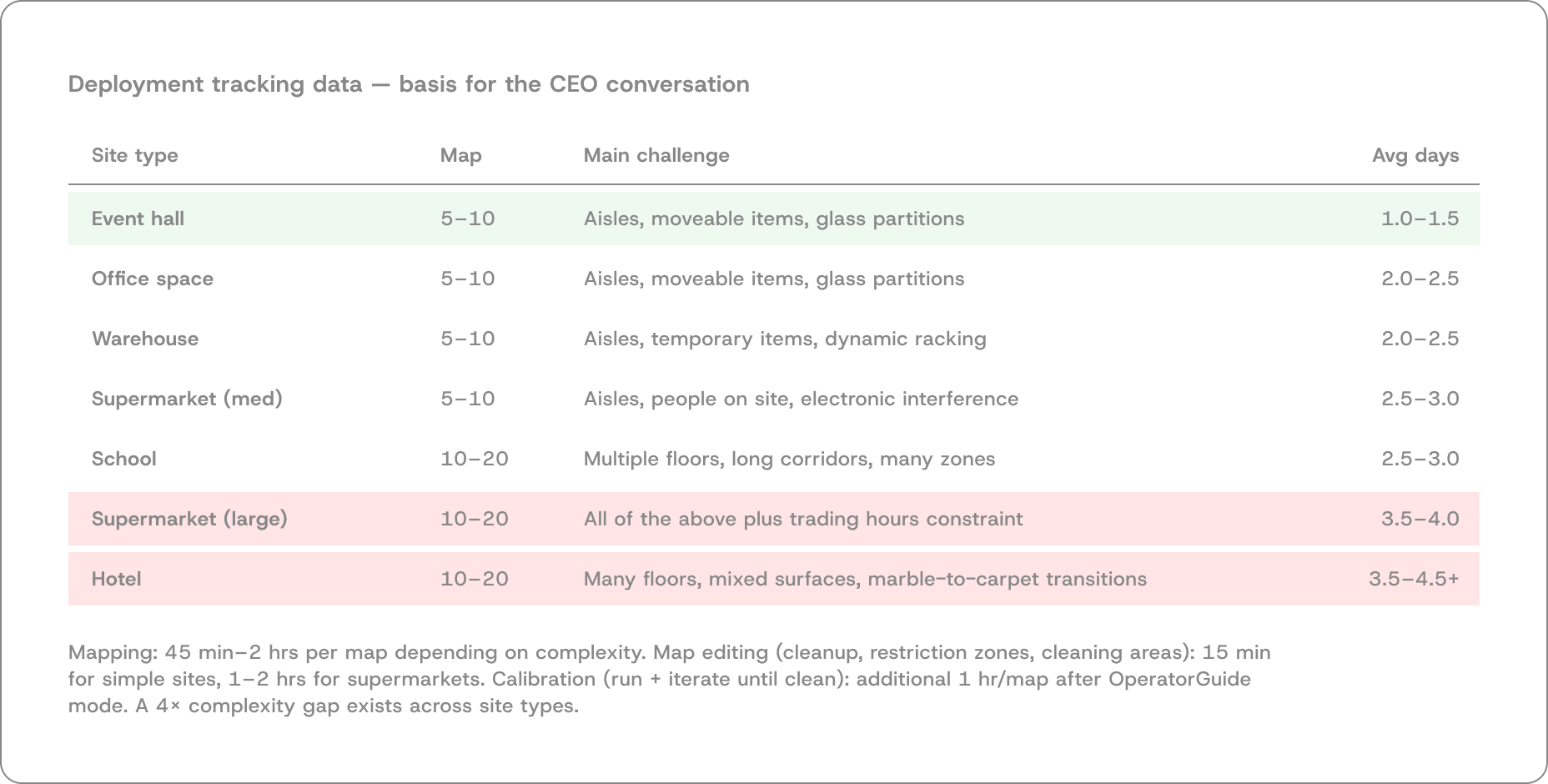
I presented this data to the CEO with a counter-proposal: progressive, site-specific targets based on map count and complexity. Each site type gets a realistic target, not an arbitrary universal one. The CEO accepted it. Every intervention that followed was designed to hit those specific targets.
The lead-level moment:
Pushing back on a brief is easy to claim and hard to do well. The difference is having evidence. Six weeks of field data made it possible to say "that target won't work, and here is why, and here is what will" — not a gut feeling, a position.
:: Service blueprint
Mapping the full system before designing any of it
Before designing a single intervention, I mapped the complete deployment lifecycle across every actor: customer, on-ground technician, remote technician, sales, engineering, and the robot software system. The blueprint reveals where frictions concentrated, where actor paths intersected, and exactly where each intervention would need to act.
This document made the scale of the problem legible — to me, to engineering, and to the CEO. It also made clear that deployment was not one problem but six or seven distinct failure points happening at different stages across different actors.
:: The system
Five interventions. Each one targeting
a different failure point.
They don't run in sequence. They work concurrently across the deployment lifecycle, each designed in direct response to what the field research surfaced.
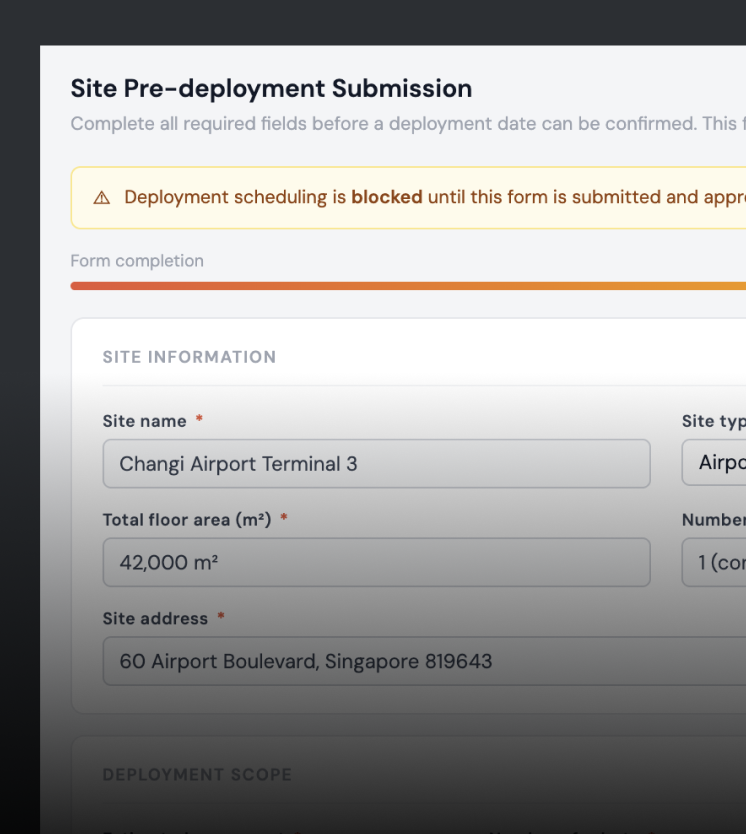
No site information before arrival. First day wasted every time.
Zoho intake form
Return visits eliminated
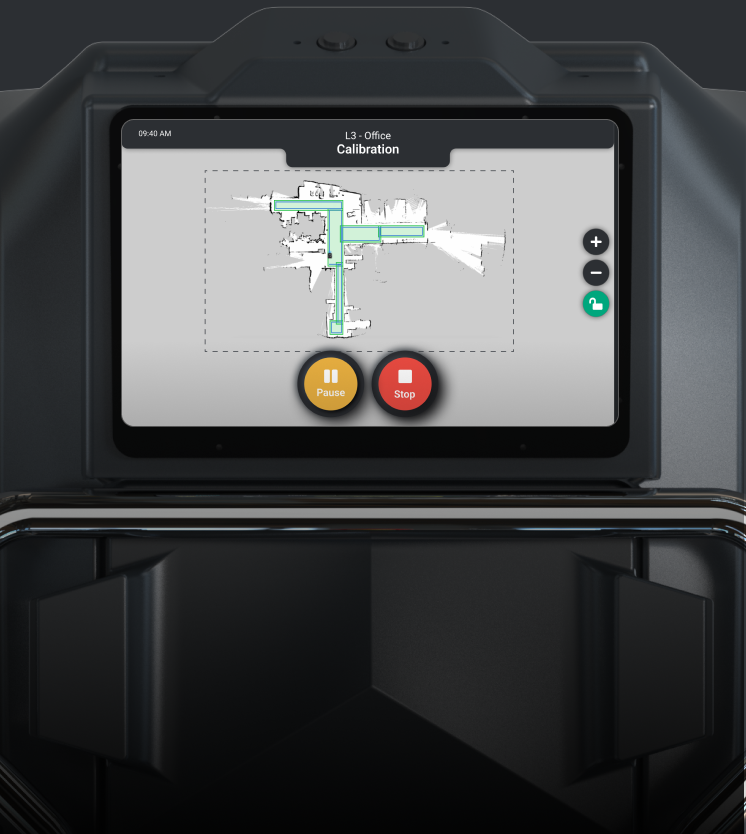
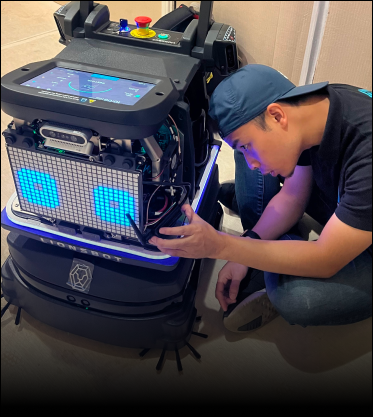
Full-area sweep hardcoded. Hotels with 50 maps took days to calibrate.
4 hrs → 1 hr per map
−75%
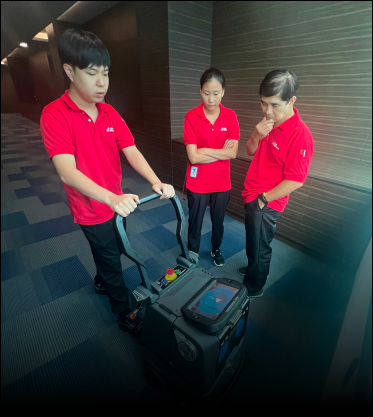
3-hour verbal training, nothing documented, repeated every site.
3 hrs → <1 hr
−67%
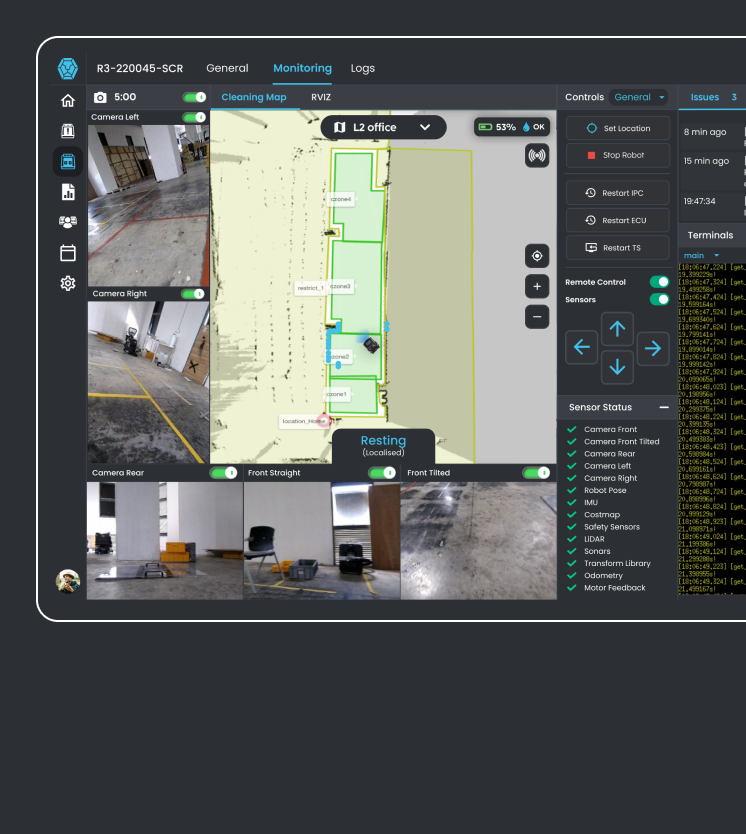
No support existed after handoff. This project created the role.
Live support on deploy day
2–3 wk post-deploy monitoring
Verbal issue reporting, no diagnostics, technician arrived unprepared.
1 tap → diagnostics → remote resolve
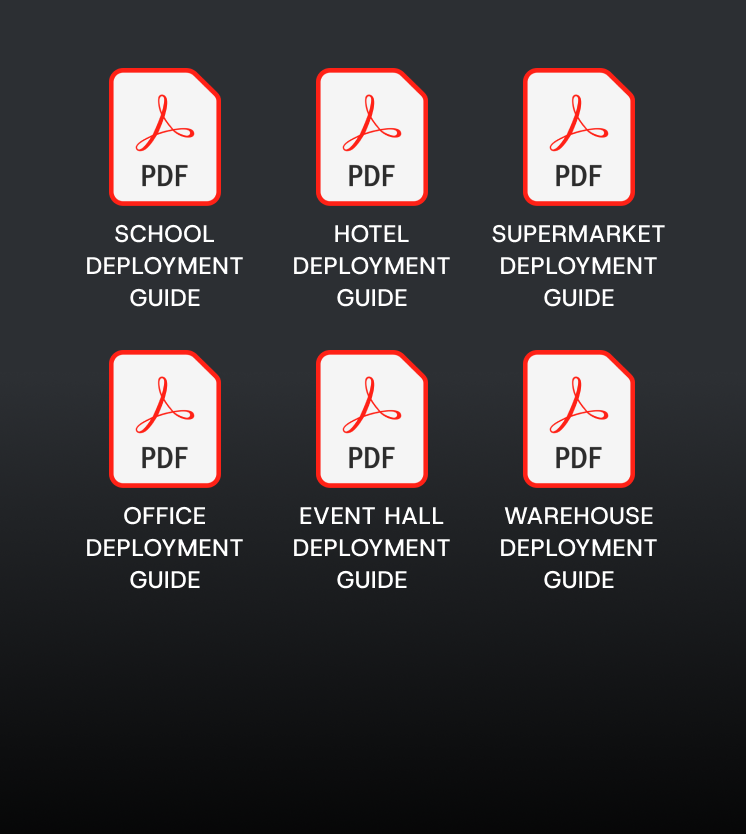
All five interventions combined into one repeatable playbook per site type.
6 site types documented
PDF shipped · in-app planned

Hover around
:: Pre-deployment workflow
Fixing the root cause of wasted first days
User story
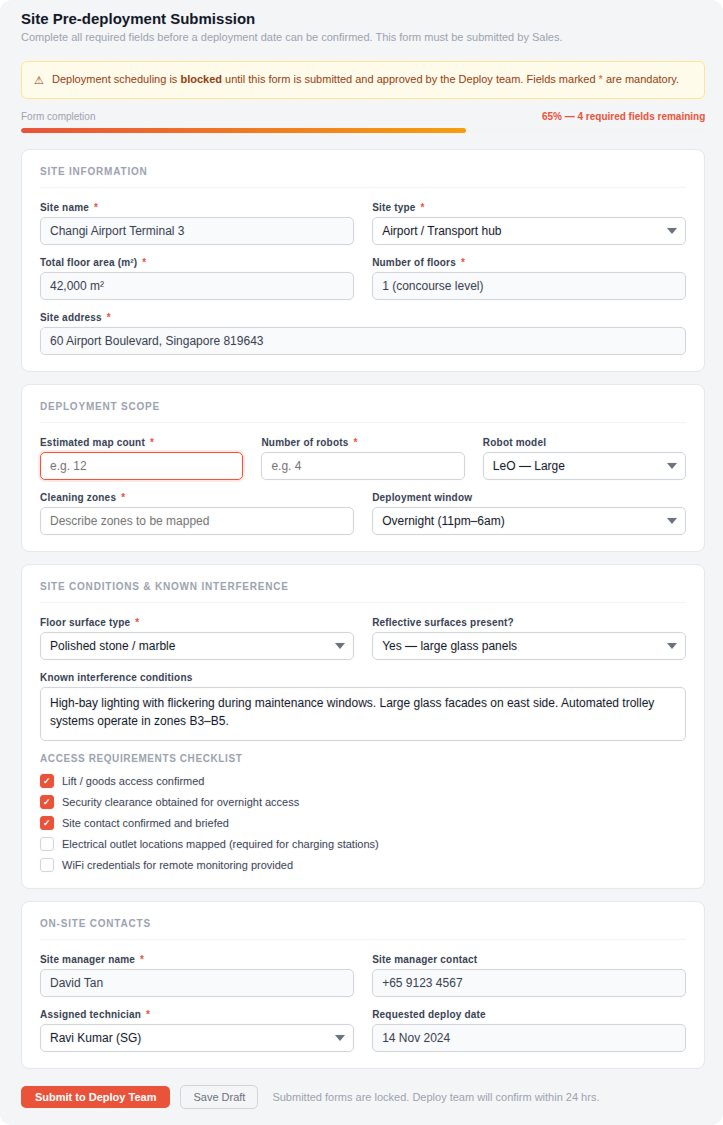
Technicians needed complete site information before travelling — map count, floor type, interference conditions, access requirements. Sales had the customer relationship but no process for capturing any of it.
Problem
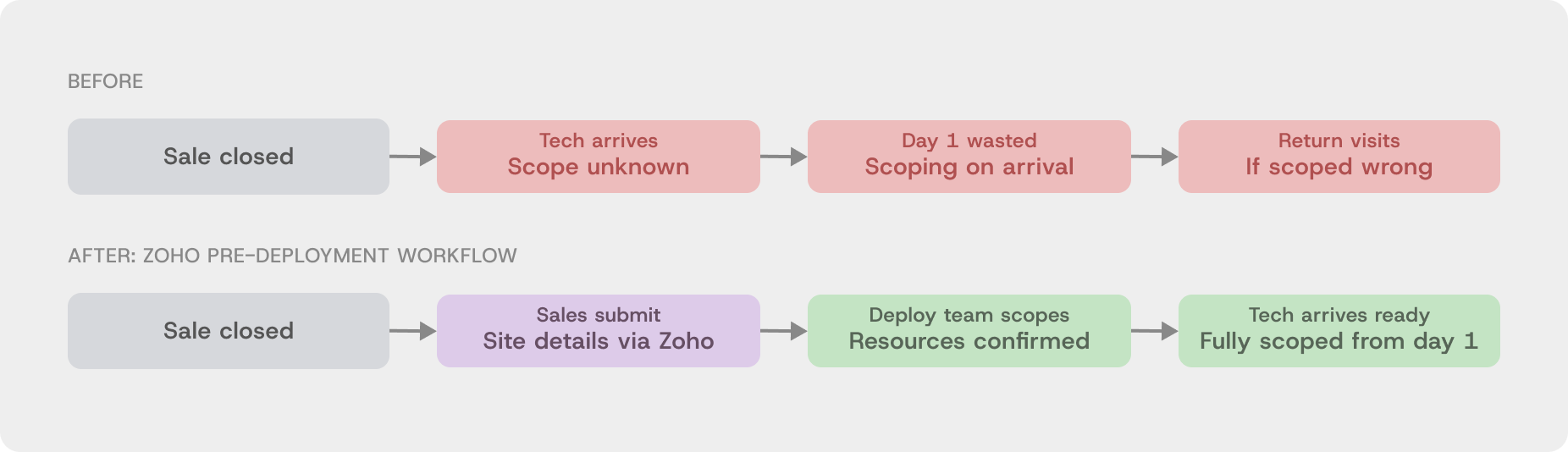
Technicians arrived blind. Scope was confirmed on arrival, costing the first 1–2 hours of every deployment. For international trips, flights and hotels were already booked against an unverified scope. Return visits were common when the on-site reality didn't match what was assumed.
Design thinking
The failure was in the Sales-to-Operations handoff, not the technician. A structured Zoho intake form, mandatory before a deployment date could be confirmed, gates scheduling rather than just requesting information. It lives inside the CRM Sales already uses — no new tool, no new login.
Validation
3-month POC with the Singapore sales team. Sales initially resisted — felt the form added friction between closing a deal and confirming a date. We tracked return visits, first-day wasted time, and deployment duration. The results were clear. Sales presented the findings to the wider team themselves.
Rollout + impact
Rolled out globally following the POC. Return visits from missing site information dropped. Custom platform planned to replace Zoho at scale.
Pre-deployment form
What the form captured
before anyone travelled
✔ Map count and floor area
Deployment duration confirmed in advance
✔ Floor surface type
Correct calibration method prepared
✔ Interference conditions
Technician arrives with a mitigation plan
✔ Electrical outlet locations
Charging setup confirmed before travel
✔ Site contact
Right person on-site and briefed on arrival
✔ Access hours
Deployment window agreed
before anyone books flights
:: Mapping + calibration
Designed from watching how technicians actually work
User story
Technicians need to validate each mapped zone before handoff — confirming the robot won't get stuck, miss areas, or behave unexpectedly. On a hotel with 50 maps, this validation alone could take a full day.
Problem
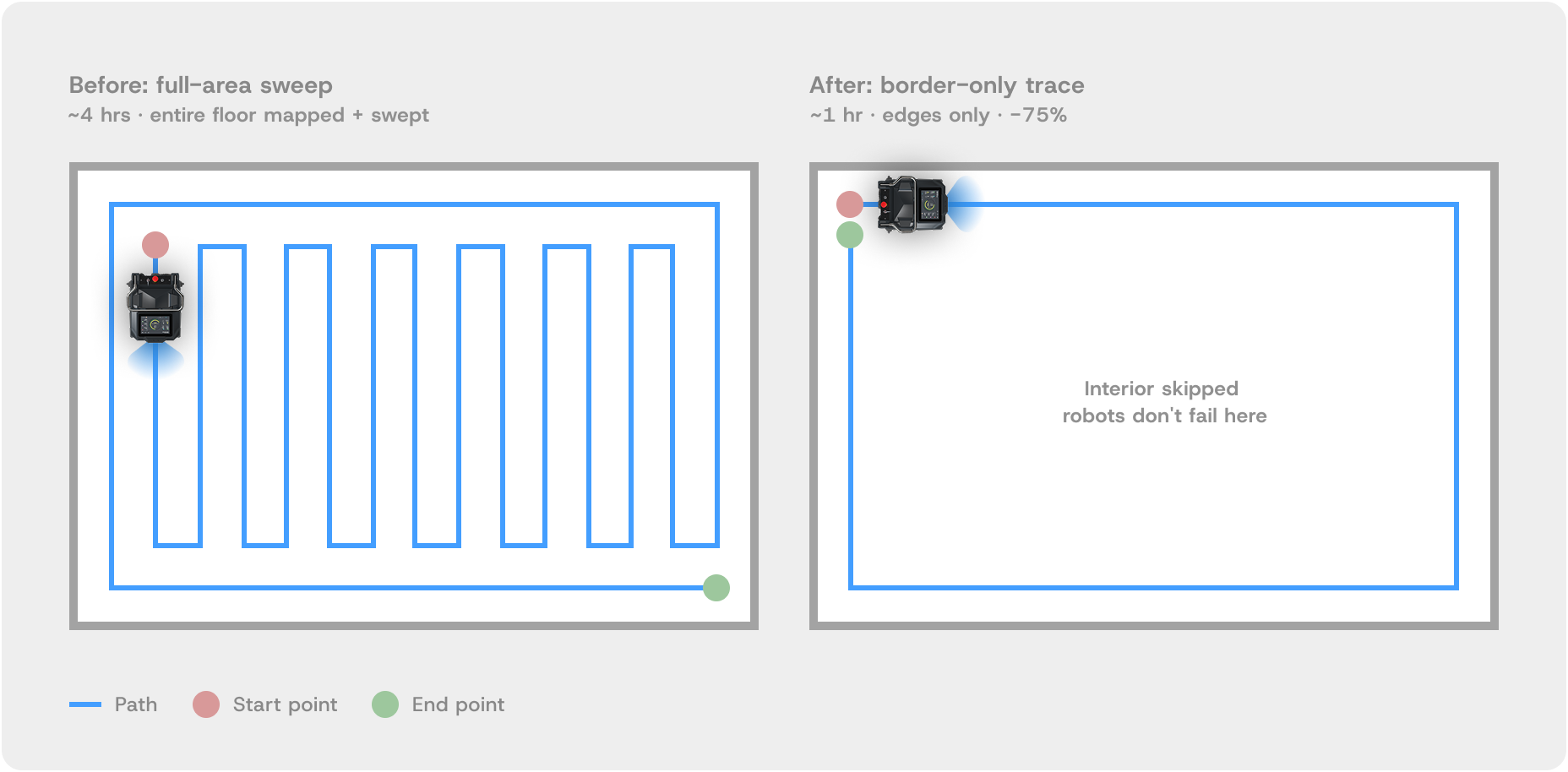
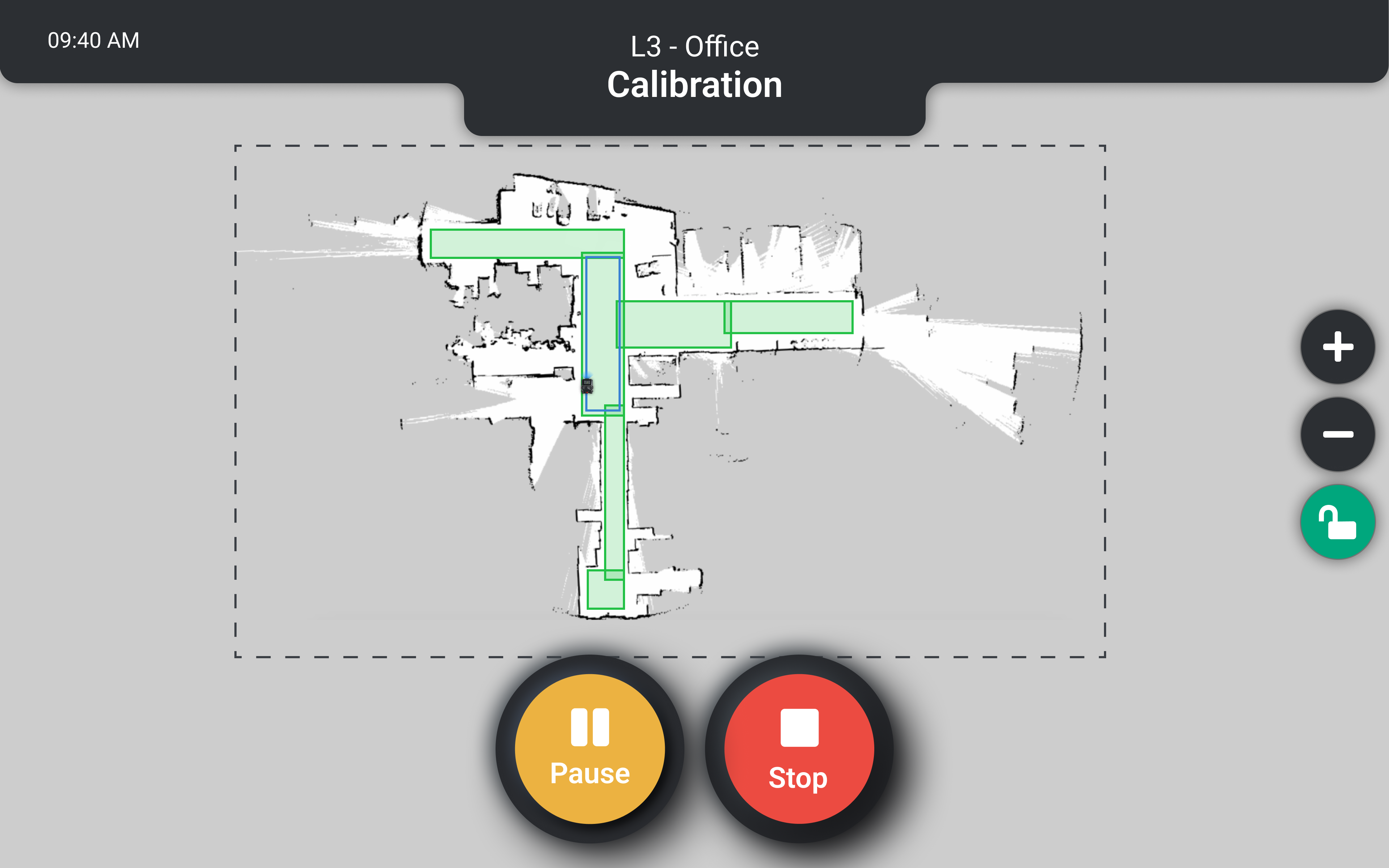
No dedicated calibration function existed. Technicians validated maps by running the full cleaning program — a zig-zag sweep across the entire floor — and watching for one thing: whether the robot got stuck at the edges. Corners, tight turns, surface transitions. Never the open floor. A mental list of problem materials (reflective marble, glass facades, refrigeration interference) existed only in experienced technicians' heads. Nothing was documented.
Design thinking
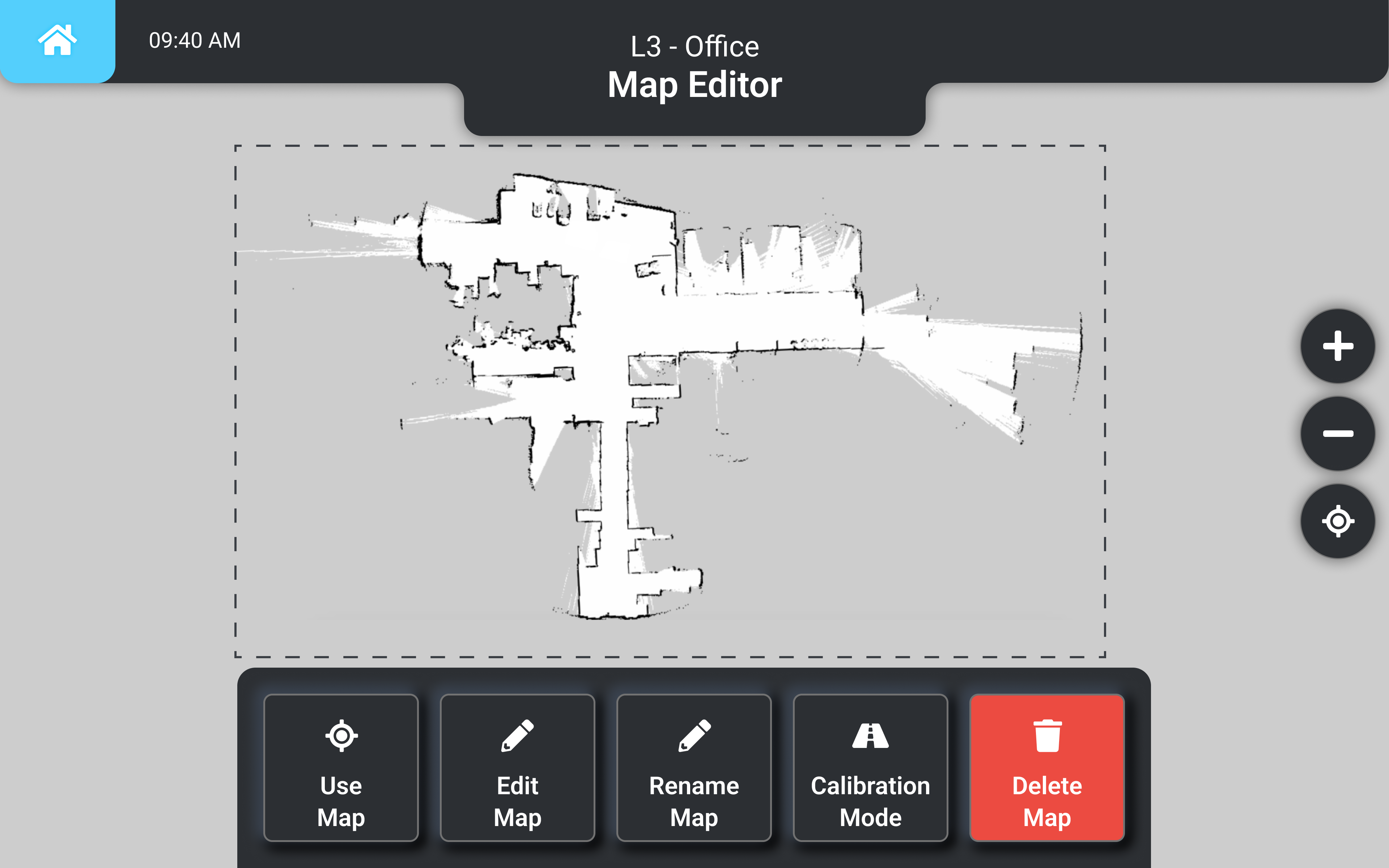
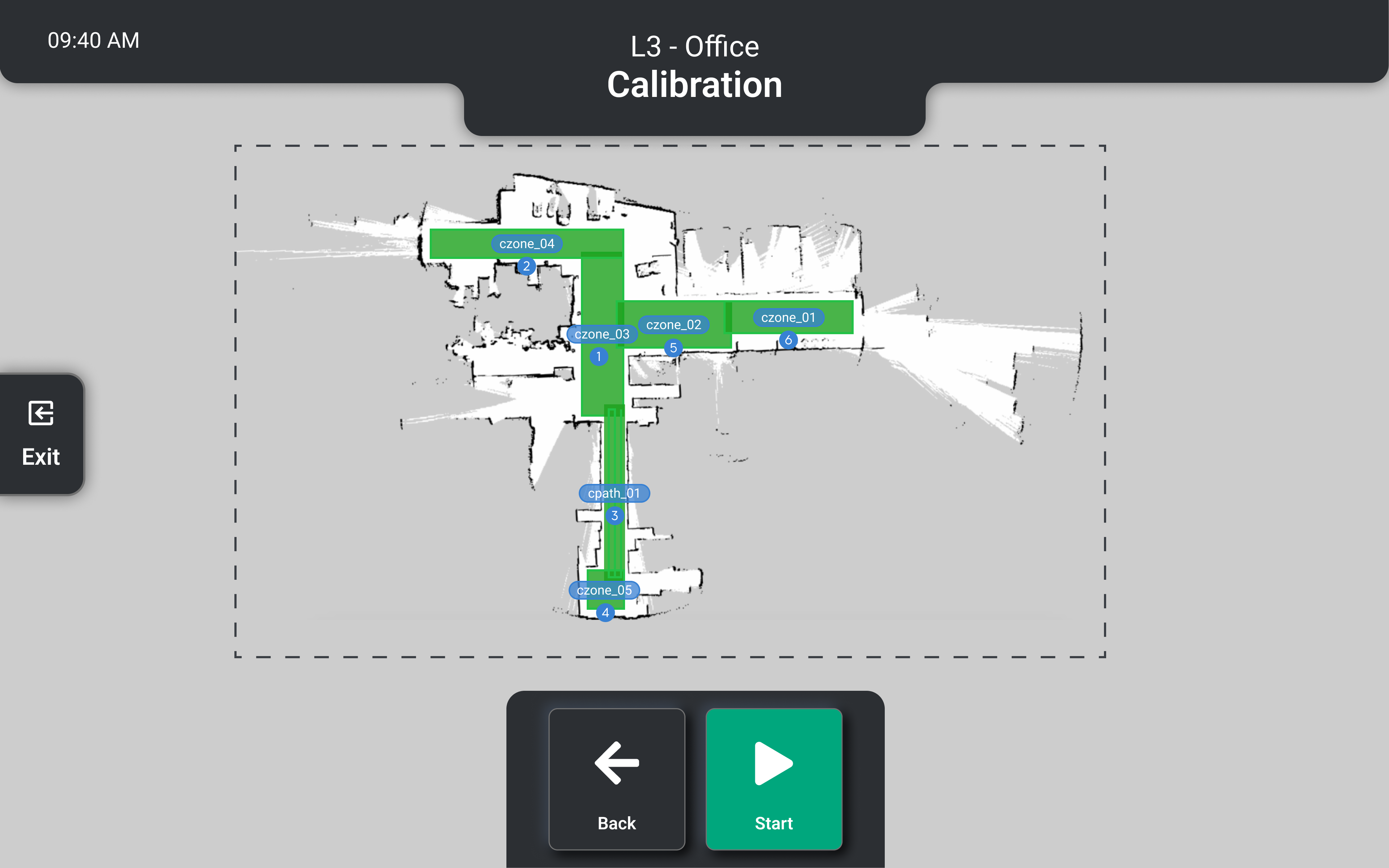
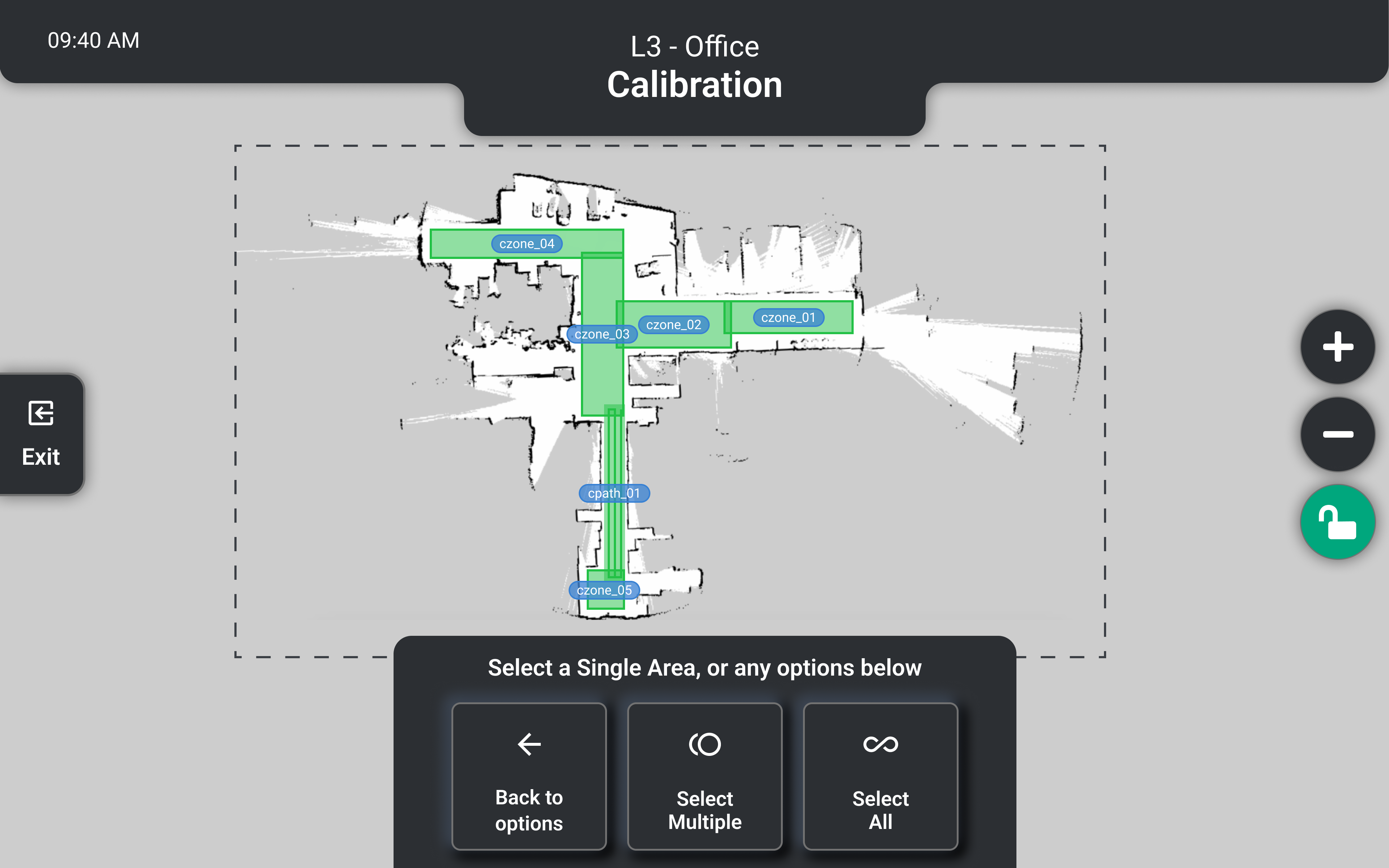
If technicians were only ever watching edges, running the entire floor was waste. Calibration Mode runs a border-only trace — the perimeter of each mapped zone, skipping the interior entirely. I also formalised the tacit technician knowledge into a site evaluation SOP and deployment checklist, designed from what experienced technicians already knew.
Validation
Built in stages with on-site validation at each phase. I brought a software engineer to every test deployment so issues could be diagnosed and fixed on the spot — rather than logged, reported, and retested on a separate trip. Faster iteration, more test cycles within the same timeframe.
Rollout + impact
Calibration time dropped from 4 hours to 1 hour per map — 75% reduction. On a hotel with 50 maps, this single change removes days from the deployment. The SOP and checklist became the foundation for the deployment cookbook.
:: OperatorGuide
Self-directed training built into the robot,
15 minutes, cannot be skipped
User story
Site staff need to learn to operate the robot safely before using it independently. The robot runs in public commercial spaces — safety compliance is not optional.
Problem
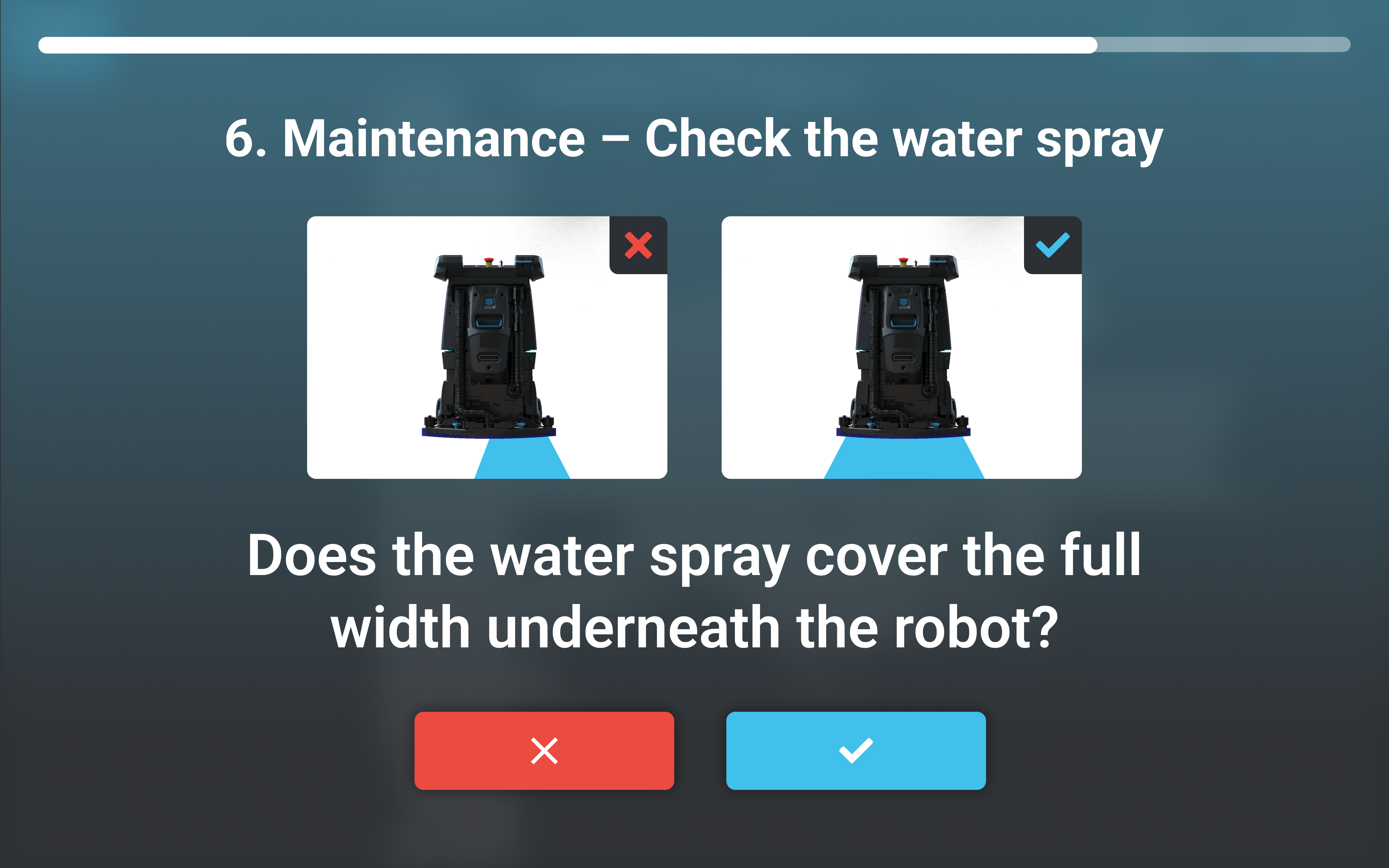
Training was a 3-hour verbal walkthrough by the technician, repeated identically at every site. Nothing was left behind. New staff hired after deployment received no training. The entire process depended on one person's presence and time.
Design thinking
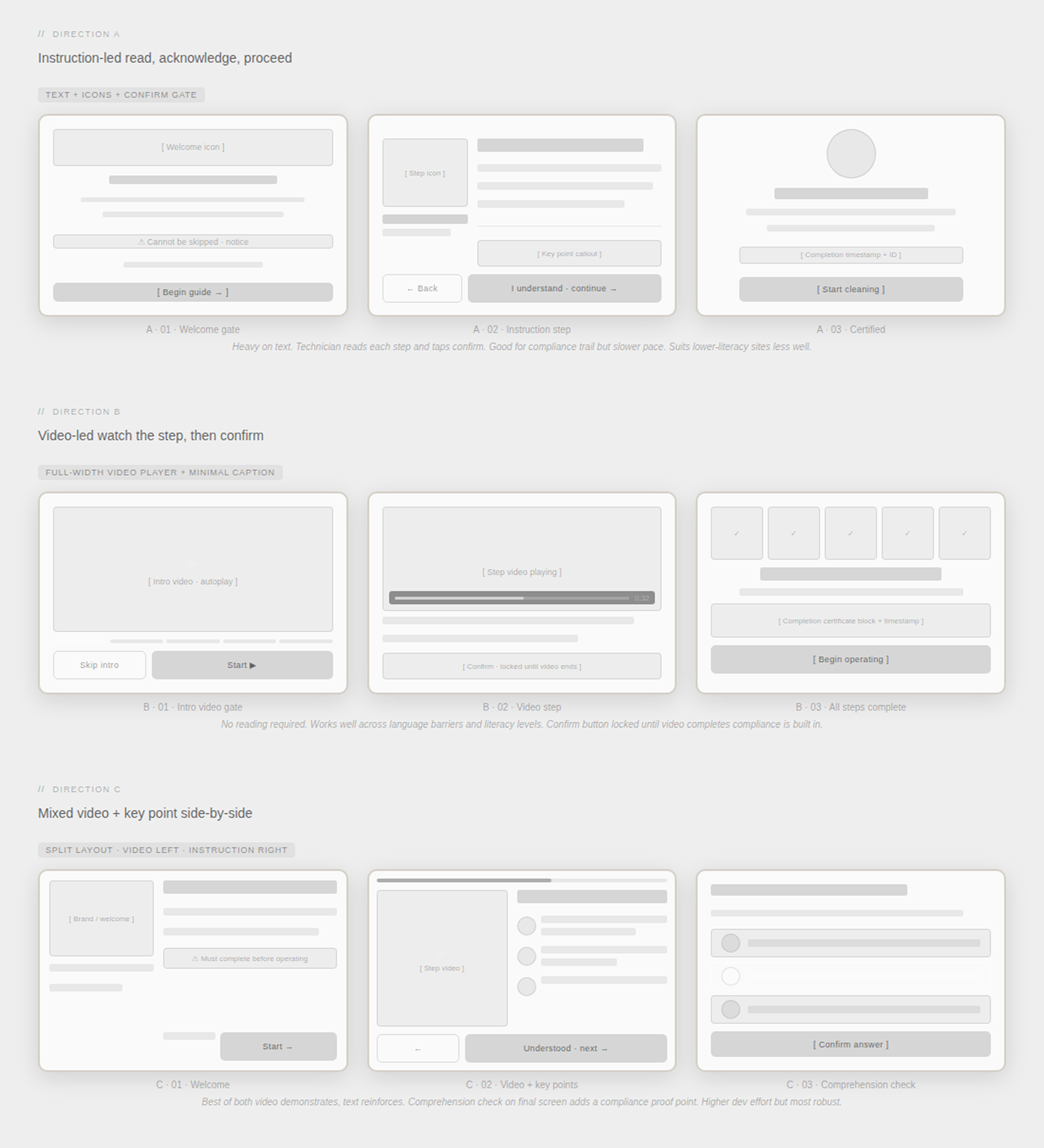
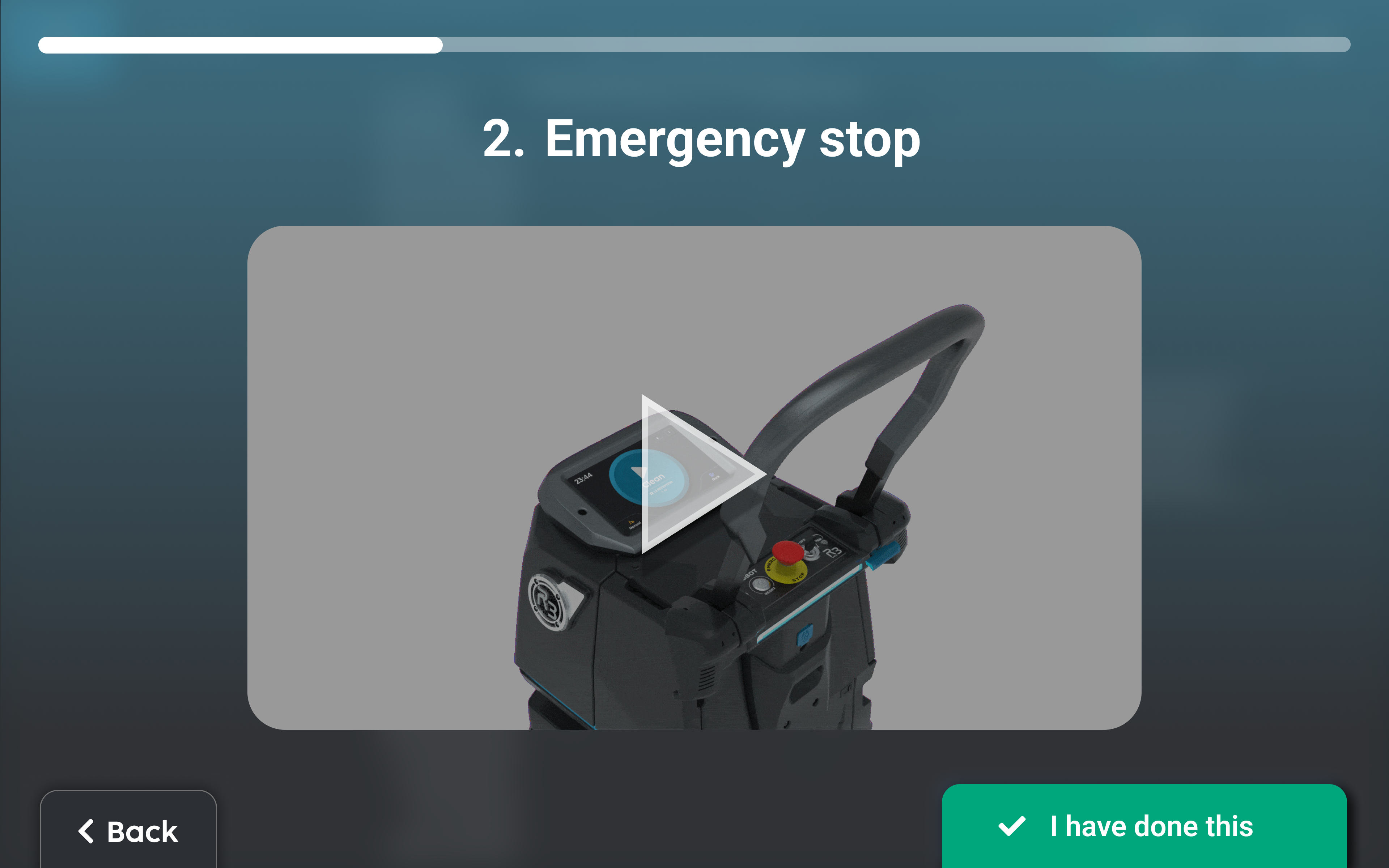
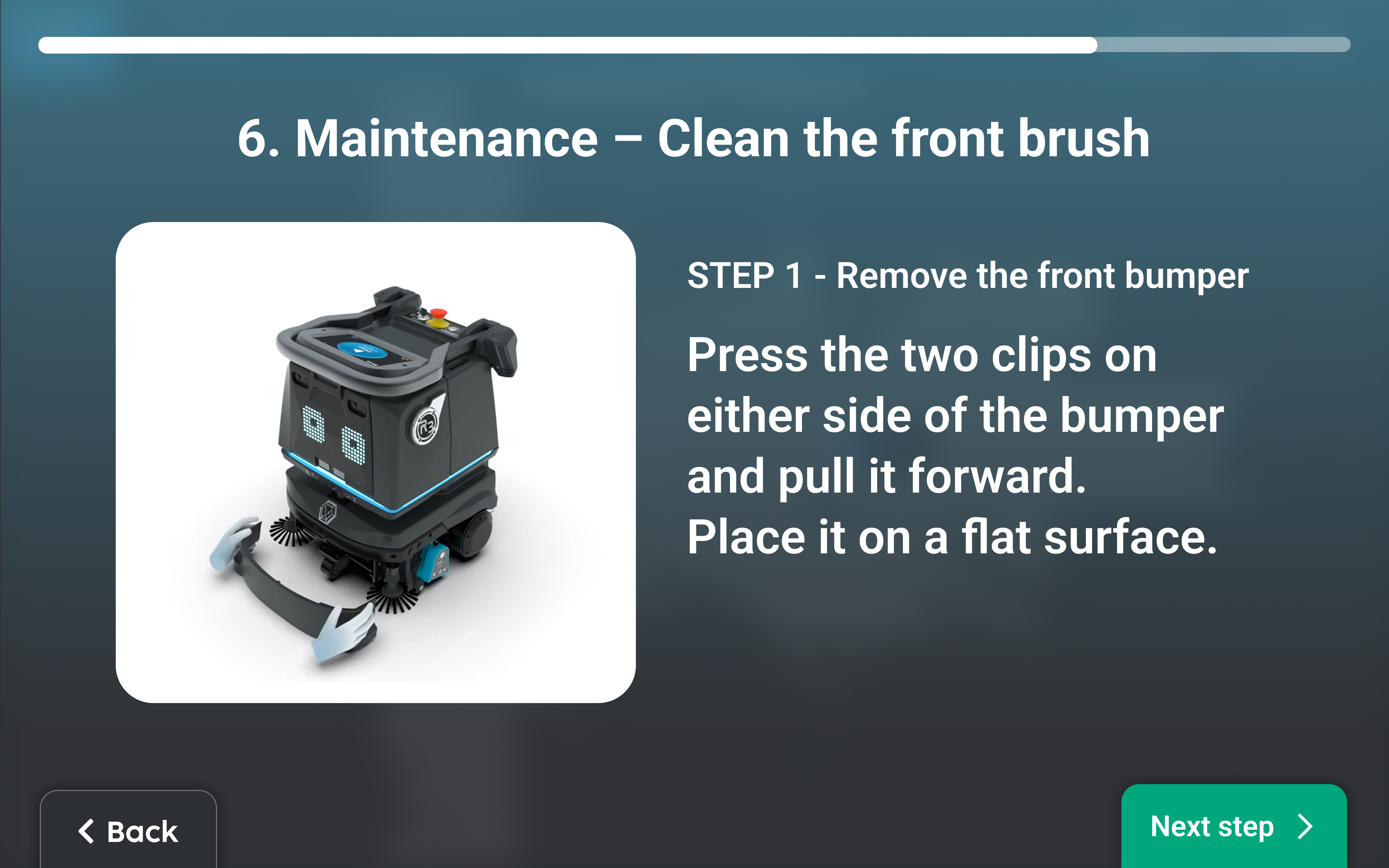
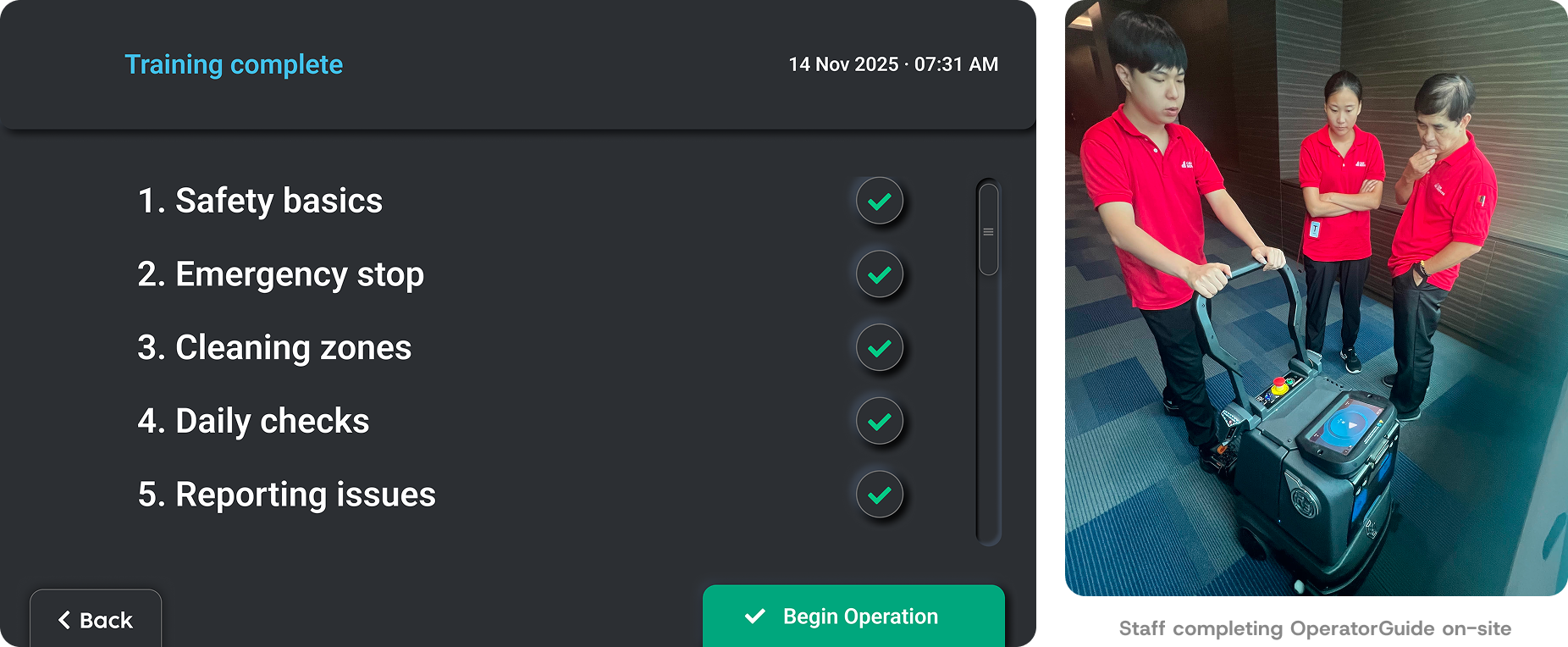
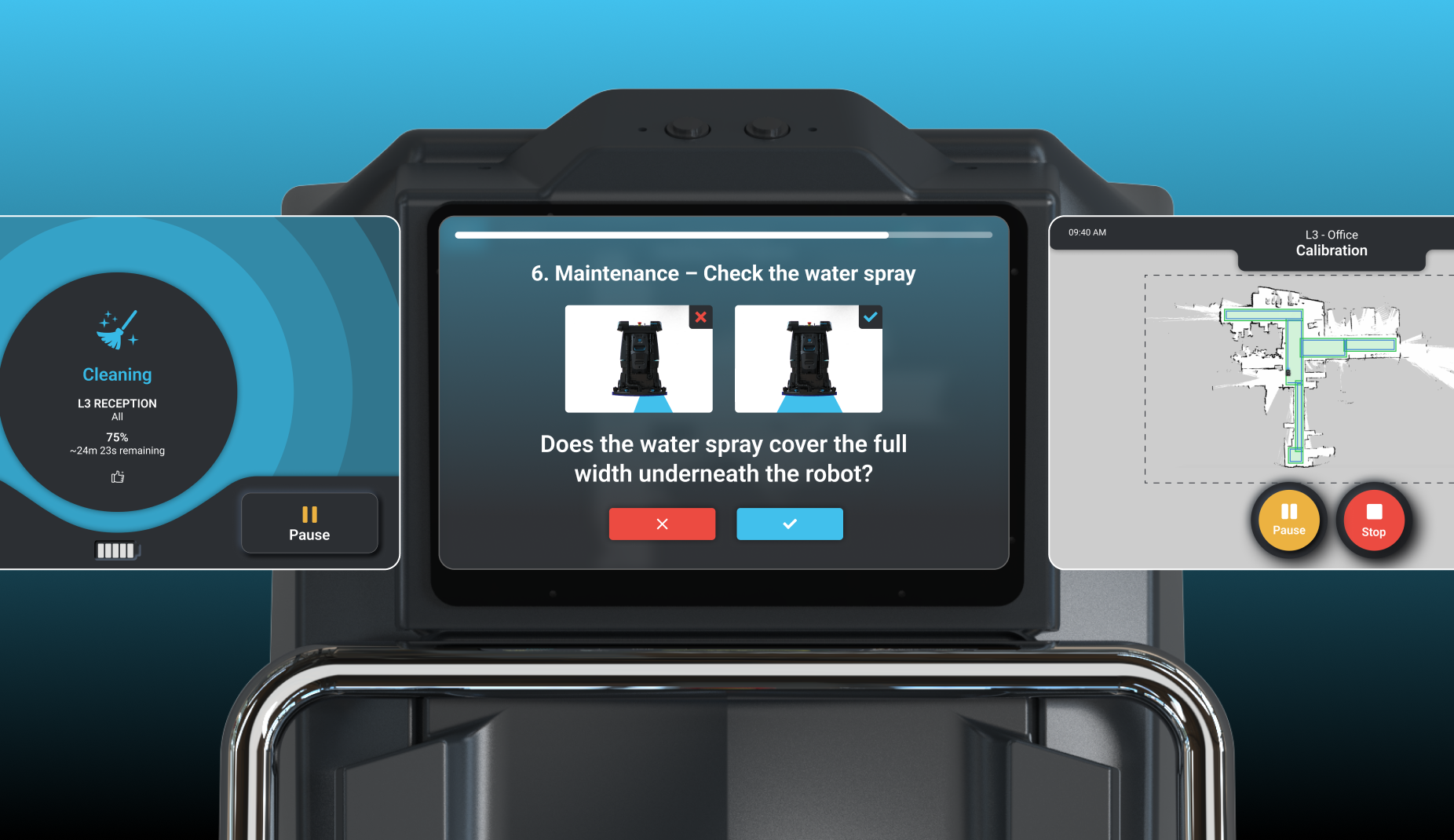
The content was well-defined — every technician covered the same steps. Moving it into the robot removes the technician dependency entirely. OperatorGuide launches automatically on first login, cannot be skipped, and runs at the user's own pace in approximately 15 minutes. The technician's session becomes 30 minutes of Q&A — higher value for both sides.
Validation
Content validated with technicians in the field, confirming it covered what they delivered verbally. The non-skippable gate reviewed and approved with the safety team.
Rollout + impact
Training time dropped from 3 hours to under 1 hour — 67% reduction. New staff hired after deployment now have a training path that doesn't require a return visit. Compliance is built into the product.
:: Remote technician model
The deployment does not end
when the technician leaves
User story
As Lionsbot expanded globally, the cost of physical presence at every deployment stage was growing unsustainably. Once a technician left a site, there was no monitoring and no structured way to catch problems before customers noticed them.
Problem
Deployment ended when the technician left. No post-deployment support model, no monitoring, no structured handoff. Issues were fully reactive — customers called the technician's personal number. Problems resolvable remotely in minutes triggered costly return visits.
Design thinking
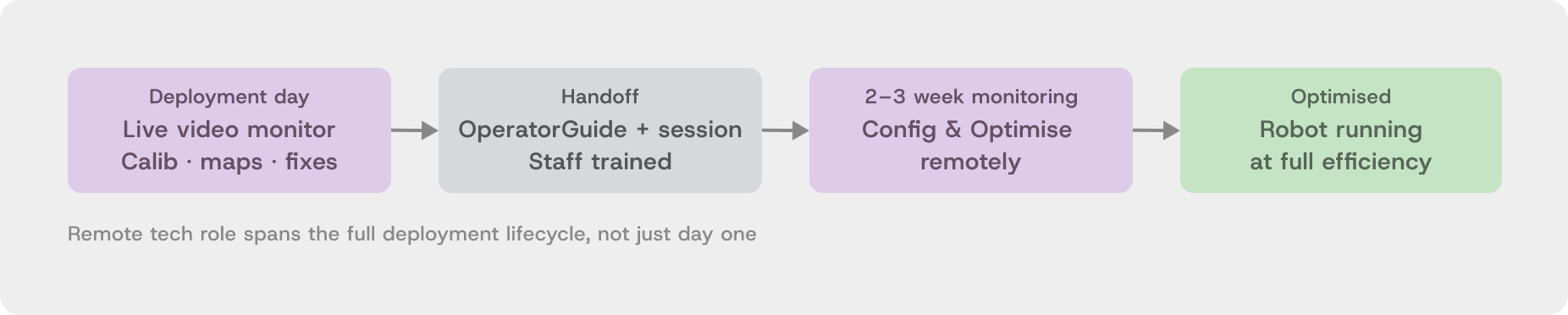
Two interventions were needed: a product one (remote management platform) and an organisational one (a new role). I defined the Remote Technician role — scope, the two-phase support model (live support on deployment day, 2–3 week post-handoff monitoring), handoff protocol, and tooling requirements. The role did not exist before this project.
Validation
Piloted on a set of deployments before being formalised. The 2–3 week monitoring window was determined from field data showing when post-deployment issues most commonly surfaced.
Rollout + impact
Now active globally. Issues caught proactively prevent customer complaints. Remote technicians handle map cleanup, zone configuration, and calibration adjustments without anyone travelling. Physical visits reserved for issues that genuinely require on-site presence.
:: QuickReport (POC in development)
One tap. Diagnostic codes sent. Issue resolved remotely.
User story
Site staff notice the robot is stuck or behaving unexpectedly. They need to report it quickly and get a resolution without navigating a complex support process.
Problem
The only reporting path was a phone call to the technician. Verbal descriptions gave no diagnostic data. Technicians travelled to sites without knowing what they were walking into — often without the right parts, sometimes for issues resolvable remotely in minutes.
Design thinking
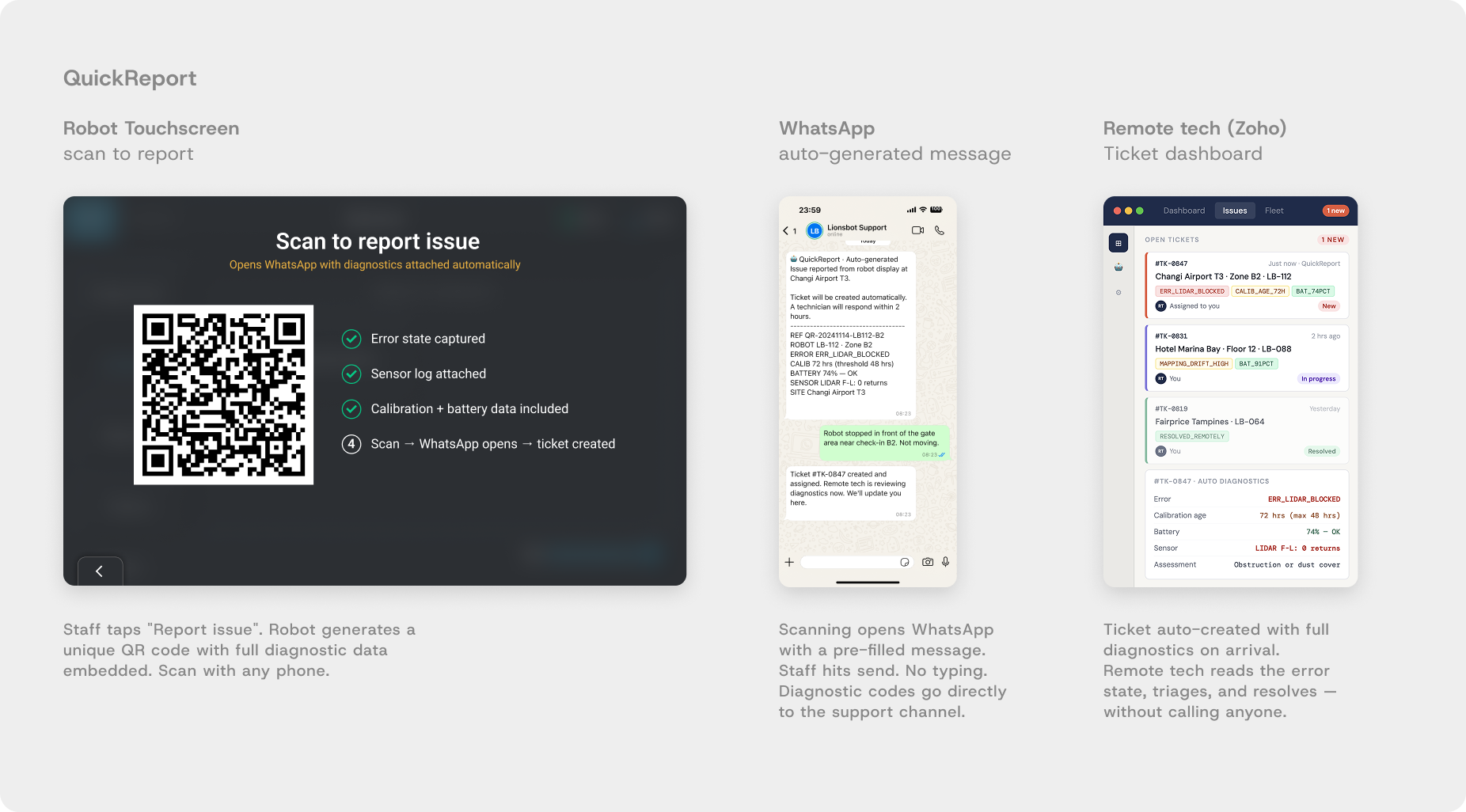
The robot already knows what is wrong. The problem was that diagnostic data wasn't being transmitted at the point of reporting. A single button on the robot display generates a QR code — scanning it opens WhatsApp (already on every staff member's phone) with a pre-filled message containing the robot's full diagnostic state automatically. Ticket auto-created, routed to the remote technician. No typing required from the customer.
Validation
POC in development. Diagnostic API being built with engineering. WhatsApp routing validated by confirming usage across all key markets.
Before
Verbal issue description — incomplete info
Technician arrives without diagnostic data
May need return visit if wrong parts brought
Every issue requires physical attendance
After — QuickReport
Full diagnostic codes sent automatically via WhatsApp
Remote tech triages before any travel decision
Site visit prepared with correct parts if needed
Most issues resolved without physical visit
Rollout + impact
POC. Expected: most issues resolved remotely without a site visit. Where a visit is needed, the technician arrives with full diagnostic context and the correct parts.
:: Product roadmap
What shipped, what is in development, what comes next
This project is not closed. The five interventions represent the first phase of a longer product arc. The deployment data collected across 6 months is the training foundation for what comes next.
:: Outcome
3 days → 1.5 days across 1,000+ robots globally
50%
faster deployment
3 days → 1.5 days
75% + 67%
calibration and training time cut
1.5-2x
increased deployment capacity · same team · same cost
What is still hard
Hotels and large supermarkets improved but remain the most complex. 50-map hotels still take 2.5 to 3 days. The complexity gap has been compressed, not closed.
Path to 0.5 days
AI-assisted calibration, auto-troubleshooting, and predictive site profiling. The deployment data and cookbooks from this project are the training foundation those features will need.
Reflection
The most important design decision on this project happened before any design work: pushing back on the initial target. If I had accepted the three-day-to-one-day mandate and worked backward from it, we would have shipped something incomplete and called it done. Building a progressive improvement system with site-specific benchmarks meant every intervention we shipped actually worked, building the foundation for the next one.
Staying on-site throughout the full six months was the other decision that made everything else possible. Research and design ran in parallel, and each deployment brought new constraints that fed directly into work already in progress. Environmental interference, sensor limitations, the physical reality of a hotel lobby at peak check-in time. None of that was in any document and it only surfaced by being there. Design that lives only in meetings produces solutions that don't survive contact with a reflective marble floor.
